


The functions of each pin of the DVI interface
Oct 23, 2026
The functions of the pins of the DVI interface vary depending on its type (DVI-A, DVI-D, DVI-I) and configuration (single channel, dual channel). Here is a detailed explanation of the functions of each pin of the DVI interface:
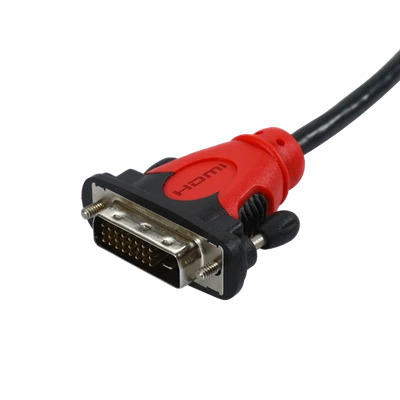
1. Overview of DVI Interface
The DVI connector interface typically contains 24 pins, which are arranged in a three-row matrix pattern, forming the main digital area of the connector. For analog or analog-compatible DVI interfaces (such as DVI-I), there are additional four pins for supporting the transmission of analog signals.
2. Function of DVI-D Interface Pins
The DVI-D interface is a pure digital signal transmission interface. Its pin configuration is divided into single-channel and dual-channel types:
Single-channel DVI-D: The pin structure is 3 rows of 6 pins, with no contacts at the top and bottom of the copper sheet. These pins are mainly used for transmitting digital video signals, including clock signals and data signals, etc.
Dual-channel DVI-D: The pin structure is 3 rows of 8 pins, with the same no-contact condition at the top and bottom of the copper sheet. Compared with the single channel, dual-channel DVI-D provides a higher data transmission bandwidth and can support higher resolutions and refresh rates.
3. Function of DVI-I Interface Pins
The DVI-I interface is compatible with both analog and digital signals, so its pin count is usually 4 pins more than that of the DVI-D interface, used for supporting the transmission of analog signals. These additional pins correspond to the pins of the DVI-A interface and are used to transmit analog video signals (such as RGB signals and horizontal/vertical synchronization signals).
4. Notes
Regarding the specific functions of each individual pin (such as clock signal, data signal, auxiliary channel, etc.), due to the complexity of the technical documentation, this article does not provide detailed pin definitions or function descriptions.
For a more in-depth pin-level analysis, it is recommended to refer to relevant technical documents or standards.
In practical operations, ensure the correct connection of the DVI interface and the cable to avoid signal transmission problems.
The above information is for reference only. If necessary, consult professional technicians or refer to relevant technical materials.
You Might Also Like
-

4K 60Hz White HDMI Type-A Female High Speed Keystone Inse...
-
Customized MDR20 Ways To DB9 And VGA15 Cable Assembly
-

4-Port USB 2.0 Data HUB with 4 individual switch
-

Mini USB 2.0 Male To RS232 DB9 Female Extension Lead Cable
-

Superspeed USB C Male To Female Extension Cable
-

USB C Male To Ethernet With USB 3.0 AM Attachable Cable