


Camera cables, they are usually an analog security camera cable, although they can also be used for IP camera wiring when combined with a signal converter in an Ethernet over Coax system. A siamese cable combines a coaxial cable and a power cable in one casing. Coaxial siamese cable is always shielded to reduce signal interference.
Why Choose Us?
Advanced Equipment
Our equipment include High-frequency welding machine, USB Auto welding machine, USB 3.1 Haba welding machine, laser welding machine, laser cutting machine, temperature and humidity cycle tester, salt spray tester, SGS Test Machine, Connector Insert Force Tester, Network Analyzer, IP67 Waterproof tester.
Wide Product Range
Its product series include peripheral connecting cables for Computer, Automobile, Aviation, Medical and other fields. At the same time, in order to meet the growing demands of customers, the company also manufactures a variety of special customized products.
Complete Qualifications
The company has passed the ISO9001:2015, ISO14001:2015 and the USB3.1 series, certification as a member of the HDMI association. Meanwhile, we own a lot of advanced production equipment and quality inspection equipment to improve production efficiency, product consistency and quality stability.
Quality Guaranteed
Kaiwin has 10 modern production lines, employs about 350 workers and covers an area of 9000㎡, with an annual production capacity of about 10 million pcs. We have a team of excellent technical personnel with more than 10 years of experience.
-
![Industrial Camera Gigabit High-flexible Shielded RJ45 Male To Male Network Cable]()
-
![Camera Link Cable SDR To MDR For Frame Grabber Industrial Machine Vision Camera]()
-
![High-flexible Double Shielded M12 8-core X Code Male To RJ45 Male Network Cable]()
-
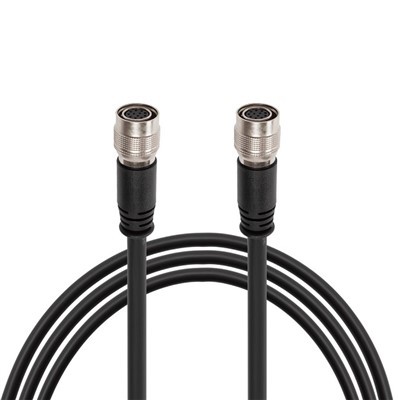
![High Flexible Hirose 12-pin Female To Female Extension Cable For Industrial Camera]()
-
![SDR To SDR Camera Link Cable]() Add to Inquiry
Add to Inquiry -
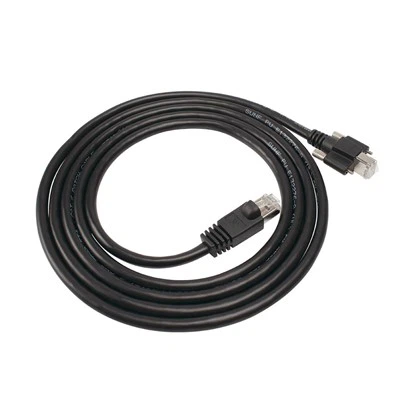
![RJ45 To Angled RJ45 Locking Screw GigE Camera Ethernet Cable]()
RJ45 To Angled RJ45 Locking Screw GigE Camera Ethernet Cable
Add to Inquiry




Benefits of Camera Cable
Reliable Signal Transmission
Properly chosen cables ensure reliable transmission of video signals, crucial for maintaining a clear and consistent surveillance feed.
Power Transmission (PoE)
Many modern cables support Power over Ethernet (PoE), eliminating the need for separate power cables and simplifying installation.
Versatility
Different cable types cater to various surveillance system needs, providing flexibility in design and installation.
Cost-Effectiveness
Choosing the right cable based on the specific requirements of the surveillance setup can result in a cost-effective solution.
Security Camera Cable Types



In the security camera industry, there are more camera wire types than you might think. While it is possible to mix and match security camera cables and connectors to a certain extent, installation and management of a security camera system is much easier when the most compatible CCTV camera wiring is used. The overarching categories are IP cameras and ethernet cable vs. coaxial cable and analog cameras.
• Network ethernet cable
These cables transmit video data over an internet connection. They can also power certain camera types, known as "power over ethernet", or PoE IP cameras. On the whole, ethernet wiring is an IP camera cable type, although it can be adapted for analog cameras with a connector known as a video balun.
• Coaxial cable / siamese cable
These cables transmit unprocessed video signals. They are usually an analog security camera cable, although they can also be used for IP camera wiring when combined with a signal converter in an Ethernet over Coax system.
A siamese cable combines a coaxial cable and a power cable in one casing. Coaxial siamese cable is always shielded to reduce signal interference.
• Plug and play cable
These pre-made cables are set up with color coded connectors that are already attached. They are also thin and flexible, making them very easy to install no matter your level of expertise. Their convenience does come at a price: as well as being more expensive, plug and play cable is usually sold in fixed lengths, making it difficult to tailor to exact site specifications.
Plug and play cable is not shielded, making it prone to electromagnetic interference. This is common in unshielded camera cable types, and you will need to carefully consider your installation plan to minimize crosstalk. Coaxial siamese cables are always shielded, and ethernet cables come in both shielded and unshielded options depending on how they will be used.
• HDMI cable
High Definition Multimedia Interface (HDMI) cables are not used in CCTV camera wiring, but they are useful in a video security system. They are most often used to transmit video and audio from recorders (such as NVRs or DVRs) to monitors for remote viewing.
• VGA cable
Similar to HDMI cables, a Video Graphics Array (VGA) cable is used to send video and audio data from a storage and/or encoding device to a display for remote viewing. Unlike an HDMI cable which simply plugs in, VGA cables also have two screw pins to secure the connector into the socket.
What are the Main Parts of Camera Cable?
Camera Cables comprise the metaphorical cardiovascular network of a CCTV system, carrying power to the cameras and returning a video signal to the DVR or monitoring station. This crucial system component is often neglected, with many users giving little thought to the cable they choose. Not all cables are created equal, however, and a vast majority of image problems are caused by poor quality or improperly installed cables. Here we see the camera cable is composed of:
Exterior Jacket - This holds everything together and protects the cable from the elements.
Shield - This is a braided conductive copper sleeve that protects the center core from electromagnetic interference. The density and quality of the shield is a very important factor in cable quality, especially in Siamese cable which has power running alongside it.
Dielectric - This is a plastic or foam insulating sleeve that maintains a specific distance between the center conductor and copper shield.
Center Conductor - This is a solid copper wire that carries the actual video signal from the camera to the DVR. Though it is the most important part of the cable, it would not work properly without the others.

Camera Cable: Ground Wiring Tips
One of the more basic camera cable management tips for floor-based wiring involves covering it. Anyone who's run an extension cord through a heavily trafficked area understands how camera cables have a way of snagging feet. Here are three ways to do that:
Cover kits provide a low profile, rounded covering over wiring that keeps cabling enclosed while allowing you to secure the covering with double-sided tape. Some kits have Velcro adhesive for carpeted areas.
Rubber ducts protect cords while also providing slip-resistant surfaces that can be custom-fit to reduce tripping risk.
Cable covers designed explicitly for carpeted areas allow you to run data or power cabling and floors with looped carpeting.
Businesses especially should pay attention to such risks, which can lead to trip-and-fall accidents and even lawsuits. Covering cabling even in lower-traffic areas not only helps keep people safe, but it also lowers wear and tear, preventing issues regarding networking or fire hazards from damaged wiring.
What Factors Should You Consider Before Selecting A Camera Cable?
It is crucial to implement a CCTV system for a specific reason, and that reason should influence the sort of camera cable you use. In a professional atmosphere, video signal and quality are essential.
A similar approach is also crucial when installing a CCTV system in an apartment complex. Ensure that you select the proper cable and install it in every corner for optimal results.
When installing CCTV systems, the copper conductor of your cable type should be 95 percent pure copper.
Before anything else, make sure you grasp the specs of each cable type. Once you narrow down your requirements, you can make a more informed decision.
While selecting the appropriate cable will necessitate some investigation, you should begin considering other factors such as location, power supply, and connections after you decide on one.

Effective Ways to Prevent Camera Cable Damage
Preventing camera cable damage primarily involves proper handling and the use of protective accessories
Proper Installation: Ensure cables are installed without overstretching or pinching, and that they follow the appropriate routing without acute bends.
Cable Management Solutions: Employ cable clips, ties, and trays to securely organize cables, preventing tangling and reducing stress.
Protective Sleeving: Use braided sleeving or conduit for added protection, especially where cables are exposed to harsh environmental conditions.
Regular Inspections: Periodically check cables for signs of wear and tear. Look for exposed wires, discoloration, or changes in texture.
Correct Usage: Avoid using cables for anything other than their intended purpose, and respect the power or data capacity limits.
Environmental Considerations: Where possible, route cables away from areas with high foot traffic, potential water exposure, or direct sunlight.
Quality Materials: Invest in cables with robust insulation and durable materials suitable for the intended environment.
How To Choose Security Camera Cables?
Selecting the proper security camera cables ensures a reliable and effective surveillance system. When choosing security camera cables to meet specific installation requirements, several important factors should be considered.
Distance
The distance between the security camera and the recording or monitoring unit is critical when selecting cables. Different cable types are designed to accommodate varying distances, with extension cables handy for longer reaches.
Connector Type
Considering the connector type is essential to ensure compatibility and secure connections. Different cables may use BNC, RJ45, or other connectors, and choosing the appropriate type based on the camera and recording equipment is vital for seamless integration.
Weather Resistance
For outdoor installations, weather-resistant cables are essential to withstand harsh environmental conditions. Cables with proper weatherproofing ensure long-term durability and reliable performance in outdoor surveillance setups.
Shielding
Shielding significantly minimizes electromagnetic interference (EMI) and radio frequency interference (RFI), which can degrade signal quality. Shielded cables are essential in environments with high levels of electrical noise.
Cable Thickness (Gauge)
The thickness of the cable, often measured in gauge, influences its power-carrying capacity and signal transmission capabilities. Thicker cables, typically with lower gauge numbers, are suitable for longer distances and higher power requirements.
Bandwidth
In the case of Ethernet cables used for IP-based cameras, considering the bandwidth capacity is crucial. Higher bandwidth cables can support higher data transfer rates, facilitating the transmission of high-definition video and other data-intensive tasks.
Camera Cable: How Do You Connect a Digital Camera to Your Computer or Laptop?
Check your camera and computer ports
Before you connect your digital camera to your computer or laptop, you need to check what kind of ports they have. Most digital cameras have a USB port that can be used to connect to a computer. Some cameras may also have an HDMI or a mini-HDMI port that can transmit video and audio signals. Depending on your computer or laptop, you may need a USB-A, USB-C, or HDMI port to connect to your camera. If you don't have the matching ports, you may need to use an adapter or a cable that can convert the signals.
Connect your camera and computer with a cable
Once you have the right ports and cables, you can connect your camera and computer with a cable. Make sure your camera is turned off and your computer or laptop is on. Plug one end of the cable into your camera and the other end into your computer or laptop. Then, turn on your camera and switch it to the appropriate mode. For example, some cameras may have a playback, PC, or webcam mode that you need to select. Your computer or laptop should automatically detect your camera and install the necessary drivers. You may also see a pop-up window or notification that asks you what you want to do with your camera. You can choose to import photos, open a folder, or launch a software.
Use a software to access your camera
Depending on what you want to do with your camera, you may need to use a software to access its features and functions. For example, if you want to transfer photos, you can use the built-in Windows Photos app or the Mac Photos app. If you want to edit videos, you can use a video editing software like Windows Movie Maker or iMovie. If you want to use your camera as a webcam, you can use a software like SparkoCam or Camera Live that can turn your camera into a virtual webcam. You may also need to adjust the settings of your camera and software to get the best quality and performance.
Troubleshoot common issues
Sometimes, when connecting your camera to your computer or laptop, you may encounter some issues. To solve these problems, make sure your cable is securely plugged in, the camera is on and in the right mode, and your computer or laptop has the latest drivers and updates. Additionally, check if your camera supports webcam functionality and that you have the correct software and settings. Furthermore, ensure that your camera has enough battery power, memory space, and resolution. You can also adjust the lighting, focus, and exposure of your camera and software as well as close any unnecessary programs or apps that may slow down your computer or laptop. Additionally, verify the compatibility of your camera and software with your computer or laptop and the platform you are using.
Enjoy your camera and computer connection
Connecting your digital camera to your computer or laptop can open up many possibilities for creativity, communication, and entertainment. You can use your camera to capture memories, share stories, or stream live. You can also use your computer or laptop to edit, organize, or backup your photos and videos. By following these steps and tips, you can easily connect your camera and computer and enjoy the benefits of both devices.
Our Factory
Founded in Dongguan in 2003,Kaiwin has 10 modern production lines ,employs about 350 workers and covers an area of 9000㎡, with an annual production capacity of about 10 million pcs. Its product series include peripheral connecting cables for Computer, Automobile, Aviation, Medical and other fields. At the same time, in order to meet the growing demands of customers, the company also manufactures a variety of special customized products.
Our equipment include High-frequency welding machine, USB Auto welding machine, USB 3.1 Haba welding machine, laser welding machine, laser cutting machine, temperature and humidity cycle tester, salt spray tester, SGS Test Machine, Connector Insert Force Tester, Network Analyzer, IP67 Waterproof tester.
Kaiwin has enhanced its internal management level through exploration and practice and placed emphasis on quality and whole-process service with technological innovation as the approach of development. While working hard to improve internal skills, it also learns from outstanding peer companies in the industry, seeking development in the process of competition and seizing opportunities amid challenges. Kaiwin is always dedicated to making every cable with Professional Spirit. Kaiwin is always dedicated to serving every customer with Professional Spirit.


Ultimate FAQ Guide to Camera Cable
Q: Camera Cable: What cable connects camera to computer?
Q: What is camera cable called?
Q: Camera Cable: What cable do I need to transfer photos from camera to PC?
Q: Can I connect my camera directly to my PC via network Camera Cable?
Q: Camera Cable: How to connect camera to computer and take pictures?
Q: How do you maintain camera cables?
Q: How can I make my camera cables last longer?
Q: How can I make my camera cables more durable?
Q: How do you strengthen camera cables?
Q: How to tidy up camera cables?
Use adhesive hooks or cable ties to secure wires to your furniture.
Invest in clips to prevent tripping hazards.
Run television cables through the wall.
Get creative.
Create your own charging station.
Hide cables in a box.
Q: How can I make my camera cable longer?
Q: How do you make camera cables look good?
Q: What are the safety precautions for waterproof cables?
De-energize with the lockout/tagout (LOTO) system.
Wear protective clothing.
Barriers should be installed to protect electrical hazards.
Keep an eye on electrical lines when working overhead.
Q: What are waterproof cables safety standards?
Q: Why is waterproof cables safety important?
Q: Camera cable:How do I connect my USB camera to my computer?
Q: Do I need a special camera cable to transfer photos?
Q: Do cameras need camera cables?
Many wired security cameras use Power over Ethernet (PoE) technology, which means they receive data and power over the same Ethernet cable. Others may require a separate power source. Wireless cameras require a separate power source, usually in the form of an electrical outlet or batteries.
Q: How do I protect my camera cables?
Run the wires through the walls or ceiling.
Hide wires behind baseboards.
Cover power cables and wires with plastic tubing.
Bury your outdoor cables.
Place cameras in hard-to-reach places.
Q: What is the best way to run security camera cables?
Dongguan KaiWin Electronics Co., Ltd. is one of the leading camera cable manufacturers and suppliers in China. We warmly welcome you to buy customized camera cable made in China here from our factory. For free sample, contact us now.
