


High-definition multimedia interfacE (HDMI) is a proprietary audio/video interface for transmitting uncompressed video data and compressed or uncompressed digital audio data from an HDMI-compliant source device, such as a display controller, to a compatible computer monitor, video projector, digital television, or digital audio device. HDMI is a digital replacement for analog video standards.
Benefits of HDMI
High-Quality Video and Audio Transmission
HDMI are designed to deliver impeccable video and audio quality. With support for high-definition (HD) and ultra-high-definition (UHD) video formats, these cables ensure that every pixel is displayed with stunning clarity.
Ease of Use and Convenience
One of the standout advantages of HDMI is their simplicity and ease of use. Unlike the days of multiple cables for video and audio, HDMI combines both into a single cable, streamlining the connection process. With a straightforward plug-and-play functionality, you can effortlessly connect your devices without the need for complex setup procedures.
Versatility and Compatibility
HDMI are remarkably versatile and compatible with a wide range of devices. Whether it's a television, monitor, projector, or audio system, HDMI seamlessly connect your devices, ensuring optimal performance across the board.
Enhanced Features and Functionality
Beyond delivering high-quality audio and video, HDMI offer additional features that enhance your multimedia experience. If you're a fan of 3D content, HDMI support 3D video transmission, allowing you to immerse yourself in a three-dimensional world.
-
![Customized HDMI® To HDMI Adapter Cable With Screw Nut]()
Customized HDMI® To HDMI Adapter Cable With Screw Nut
Add to Inquiry -
![Gold-plated 4K High Speed HDMI® Cable]()
Gold-plated 4K High Speed HDMI® Cable
Add to Inquiry -
![Gold Plated 4K High Speed HDMI® Flat Cable]()
Gold Plated 4K High Speed HDMI® Flat Cable
Add to Inquiry -
![Ultra Flat 4K High Speed HDMI® Cable]()
Ultra Flat 4K High Speed HDMI® Cable
Add to Inquiry -
![8K Ultra High Speed HDMI® Male To Male Slim Braided Cables]()
8K Ultra High Speed HDMI® Male To Male Slim Braided Cables
Add to Inquiry -
![UltraHD 8K 48Gbps With Ethernet HDMI® Female To Female Coupler]()
-
![Customized Angled HDMI® Male To Female Adapter]()
Customized Angled HDMI® Male To Female Adapter
Add to Inquiry -
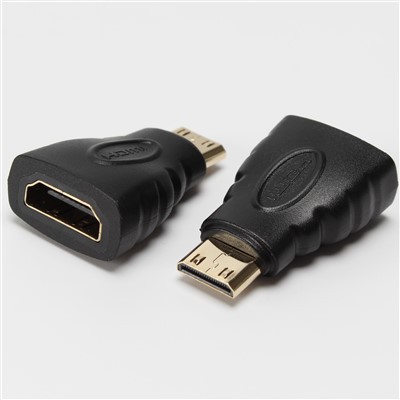
![Mini HDMI® Male To HDMI Female Adapter]()
Mini HDMI® Male To HDMI Female Adapter
Add to Inquiry -
![Micro HDMI® Male To HDMI Female Adapter]()
Micro HDMI® Male To HDMI Female Adapter
Add to Inquiry -
![Gold Plated HDMI® Female To Female Adapter Coupler 8K@60Hz 4K@120Hz]()
-
![Gold Plated 270 Degree Angled HDMI® Male To Female Adapter]()
Gold Plated 270 Degree Angled HDMI® Male To Female Adapter
Add to Inquiry -
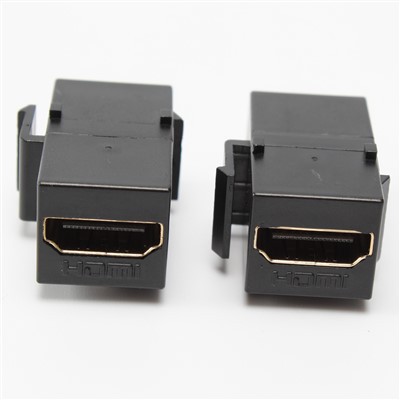
![Black HDMI® Female To Female Keystone]()
Black HDMI® Female To Female Keystone
Add to Inquiry




Why Choose Us
Advanced Equipment
Our equipment include High-frequency welding machine, USB Auto welding machine, USB 3.1 Haba welding machine, laser welding machine, laser cutting machine, temperature and humidity cycle tester, salt spray tester, SGS Test Machine, Connector Insert Force Tester, Network Analyzer, IP67 Waterproof tester.
Wide Product Range
Its product series include peripheral connecting cables for Computer, Automobile, Aviation, Medical and other fields. At the same time, in order to meet the growing demands of customers, the company also manufactures a variety of special customized products.
Complete Qualifications
The company has passed the ISO9001:2015, ISO14001:2015 and the USB3.1 series, certification as a member of the HDMI association. Meanwhile, we own a lot of advanced production equipment and quality inspection equipment to improve production efficiency, product consistency and quality stability.
Professional Technical Team
Kaiwin has 10 modern production lines, employs about 350 workers and covers an area of 9000㎡, with an annual production capacity of about 10 million pcs. We have a team of excellent technical personnel with more than 10 years of experience.
Types of HDMI Connector Cables




Type A (Standard HDMI): The most common type of connector is 'Type A', which is used by most devices and computers (including yours). It's the biggest of the bunch and often found on the end of your HDMI cable that goes into your TV or monitor (or laptop).
Type B (Dual Link HDMI): The type B connector was also launched with the original standard in 2002 and it is aimed at carrying dual link DVD-I video. Type B offers similar functionality as Type A but has only 15 pins instead of 19; this allows more room for power cables when connecting devices together so they don't get tangled up as easily while still offering all necessary connections needed between one another via HDMI cables running between them.
Type C (Mini HDMI): This type of HDMI, also known as the Mini HDMI connector, is much smaller footprint than the Type A. If you want to connect something like a game console or other device with a very small port into your TV's larger port then you'll need 'Type C'. This connector saves space as it allows you to use a thinner cable than usual but still provides full 4K resolution at 60 frames per second!
Type D (Micro HDMI): Type D HDMI connector maximizes space efficiency, and its cross-sectional footprint is an astounding 72% smaller than the Type A connector at 6.4 x 2.8mm. And as unbelievable as it may seem, they managed to cram all 19 pins into this configuration while maintaining every HDMI feature. However, you're unlikely to stumble across a product that requires an HDMI Type D connector, and they're uncommon enough that if you do, the device you're using will almost certainly have one already.
HDMI Cables Length
A regular (read: passive) HDMI cable should be no longer than 49 ft. (15 m). Note that with this length you have to accept limitations in resolution. A resolution of 4K (3840 x 2160 pixels) is possible up to approx. 24 ft. (7.5 m). Go anywhere beyond that and the maximum resolution is limited to 1080p (1920 x 1080 pixels). However, this limitation only applies to passive HDMI cables. Higher resolutions and more frames per second are also possible over long distances. For this you need an active HDMI cable or an HDMI extender.
A wide range of resolutions and frame rates: HDMI supports a wide range of resolutions and frame rates, which means you can connect almost any device to an HDMI-equipped TV. For example, the current standard for HD is 1080p/60Hz (1920x1080 pixels at 60 frames per second), while the latest 4K UHD TVs support 3840x2160 pixels at 60Hz (or 4096x2160p/24Hz).
Audio formats: HDMI also has different types of audio format support: PCM, Dolby Digital, or DTS channels(5.1 Channel Dolby Audio Soundbar with Wireless Subwoofer & Surround Satellite Speakers is equipped with Dolby Audio® and DTS® Virtual). That's right—you can get multichannel surround sound out of your TV via the same cable that carries all your video signals.
Video formats: There are multiple video formats supported by HDMI cables: 8K Ultra HD (7680x4329p), 4K Ultra HD (3840x2160p), 3D video with either active or passive glasses, 1080p Full HD resolution (1920x1080), 720P HD resolution (1280×720). TCL has 8K Mini LED TV, 4K Mini LED TV, 4K QLED TV and 4K HDR TV that supports these video formats.

When Uses HDMI?

Generally, HDMI is the best connection when you are going to use to link most modern audio/video devices together. Older devices may not have an HDMI port, but most of the devices that made in recent years have this connection. For sending the video and the audio signals, it requires one cable; sometimes, you will be unable to use HDMI to attach all your devices because of some situations. For case, one one device, you may use a DVI connector and an HDMI connector on another.
With the help of DVI to HDMI adapters, there is an option to change one end of a cable from one connector type to another. Therefore, a normal HDMI cable can be used, you only need to plug the adapter into the DVI connection. But remembr that through this, you will only be able to transmit the picture. In contrast to HDMI, DVI only has the ability to support video signals. In this example, like coaxial or optical audio, you will only be able to send the audio. All HDMI devices have the capability of supporting HDCP.
What Are the Versions of HDMI?
HDMI 1. 0: The early version of the format was aimed at allowing for the streaming of standard and high-definition video together with 8 channels of audio, with a maximum bandwidth of 4. 95 Gbps.
HDMI 1. 3: Provided an extension to higher resolutions and refresh rates, deep color, and better additional audio codec support like Dolby TrueHD and DTS-HD Master Audio, which raised the bandwidth to 10. 2 Gbps.
HDMI 1. 4: New features include 3D video, 4K@30 Hz, and an Audio Return Channel (ARC). It also had an Ethernet channel that enabled data transmission between HDMI devices in a network.
HDMI 2. 0: New features include higher resolution 4K operation at 60Hz, up to 32 audio channels, and a broader set of colors. It also widened the bandwidth to 18 Gbps, which opened the possibility of increased frame rate and clearer audio.
HDMI 2. 1: Announced the 60Hz 8K support, 120Hz 4K, dynamic HDR, and eARC. The bandwidth was thus increased to 48Gbps which enabled provision of more elaborate and real-time visual data.
HDMI 2. 1a: Introduced Source-Based Tone Mapping (SBTM), which contributes to enhancing HDR content display with the possibility to control tone mapping by the source device.
What is the Difference Between HDMI 1.4 and HDMI 2.0?
Here are some of the main differences between HDMI 1.4 and 2.0
Resolution
HDMI 1.4 supports 4K resolution at 30Hz, while HDMI 2.0 supports 4K resolution at 60Hz.
Bandwidth
HDMI 2.0 has a higher bandwidth of 18Gbps compared to HDMI 1.4’s maximum of 10.2Gbps.
HDR
HDMI 2.0 supports High Dynamic Range, providing a wider range of colors and greater contrast in the image.
Dual Video Streams
HDMI 2.0 can transmit two separate video streams to the same screen.
Audio
Both HDMI 1.4 and 2.0 support up to 8 channels of uncompressed audio.
Factors to Consider When Selecting HDMI
Consider HDMI Standards and Versions
HDMI technology has evolved over the years, with different versions offering varying levels of performance. The most common HDMI standards include: HDMI 1.4: Supports 1080p resolution and limited 4K resolution at 24Hz. HDMI 2.0: Supports 4K resolution at 60Hz, making it suitable for most business applications, including presentations and digital signage. Selecting the right HDMI version ensures your business can handle current demands and future-proofs your setup for emerging technologies.
Evaluate Cable Length and Quality
Cable length is a critical factor in HDMI performance. While longer cables can bridge distances between devices, they may also result in signal degradation. For most business environments, HDMI cables up to 50 feet can deliver reliable performance without the need for signal boosters. Additionally, consider the quality of the HDMI cables. High-quality cables with proper shielding minimize interference and maintain signal integrity.
Assess Compatibility with Existing Equipment
When selecting HDMI products, compatibility with your existing equipment is vital. Ensure that the HDMI products you choose, whether cables, splitters, or switches, are compatible with your current devices.
Plan for Future Growth
Your business’s technology needs may evolve, so it’s wise to select HDMI products that can accommodate future growth. Opt for products that support higher resolutions, additional HDMI ports, and advanced features to ensure scalability as your business expands.
Resolution and Refresh Rate
The resolution and refresh rate you plan to use should be supported by the HDMI cable. For example, 4K at 60Hz, 120Hz, or even 8K at 60Hz requires a high-speed HDMI cable with adequate bandwidth. If your setup involves gaming or high-definition video playback, make sure the cable supports the required specifications.
What Devices can Use HDMI?
Televisions
Most modern TVs come with HDMI ports, allowing them to connect to various media devices such as set-top boxes, gaming consoles, and streaming devices for high-definition video and sound.
Gaming Consoles
Consoles like the PlayStation, Xbox, and Nintendo Switch use HDMI to output high-quality video and audio to compatible displays, ensuring a smooth gaming experience.
Blu-ray and DVD Players
These media players use HDMI to deliver high-definition video to televisions or projectors, ensuring that users can enjoy high-quality images and sound from their movie collections.
Laptops and Computers
Many laptops and desktop computers feature HDMI ports, allowing them to connect to external monitors or projectors. This is often used for presentations, multitasking, or enjoying media on a larger screen.
Streaming Devices
Devices like Amazon Fire TV Stick, Roku, and Apple TV use HDMI to stream content from the internet to a television or monitor, providing access to various streaming services in high definition.
Projectors
Modern projectors often come with HDMI inputs, enabling them to display content from computers, media players, or gaming consoles, making them ideal for home theaters, offices, and classrooms.
Maintenance Tips
Avoid bending, twisting, or stretching your HDMI cables, as this can damage the internal wires and connectors.
Avoid exposing your HDMI cables to extreme temperatures, humidity, or sunlight, as this can cause corrosion, cracking, or fading of the cable.
Avoid placing heavy objects on your HDMI cables or pulling them too hard, as this can cause breakage or disconnection of the cable.
Avoid using your HDMI cables near sources of interference, such as magnets, electric appliances, or wireless devices, as this can affect the signal quality and performance of the cable.
Clean your HDMI cables regularly with a soft cloth and a mild cleaner, and remove any dust or dirt from the ports and connectors.
Store your HDMI cables properly when not in use, such as coiling them loosely and keeping them in a dry and cool place.
FAQ
Q: What are the benefits of using HDMI?
Q: Should I use HDMI or another connector?
Q: Should you use HDMI, DisplayPort, or USB-C for a 4K monitor?
Q: Can HDMI carry audio and video together?
Q: What is the maximum resolution and refresh rate that HDMI supports?
Q: What is HDCP, and why is it important for HDMI?
Q: Can I connect multiple devices to a single HDMI port on my TV?
Q: What is the difference between HDMI and DisplayPort?
Q: What is the difference between HDMI 1.4 and HDMI 2.0?
Q: What is the difference between HDMI and VGA?
Q: What is HDMI audio extraction?
Q: What does EARC mean on HDMI?
Q: What is the latest version of HDMI?
Q: How often should I replace my HDMI cable?
Q: Why is my HDMI suddenly stopped working?
Q: Why am I getting no HDMI signal?
Q: How do I test my HDMI?
Q: Does all type C support HDMI?
Dongguan KaiWin Electronics Co., Ltd. is one of the leading hdmi manufacturers and suppliers in China. We warmly welcome you to buy customized hdmi made in China here from our factory. For free sample, contact us now.
