

Can a parallel cable be used for kiosk connections?
May 25, 2026
In the realm of kiosk connections, the question of whether a parallel cable can be used is a topic that merits in - depth exploration. As a parallel cable supplier, I've witnessed firsthand the diverse needs of customers and the various applications where parallel cables come into play.
Understanding Parallel Cables
Parallel cables are designed to transmit multiple data bits simultaneously over multiple wires. This is in contrast to serial cables, which transmit data one bit at a time. The parallel interface has been around for a long time and was widely used in printers, scanners, and other peripheral devices.
The most common parallel connector is the DB - 25 connector, which has 25 pins. These pins are used to transfer data, control signals, and power. Another type of parallel connector is the CN - 36, which is also used in some specific applications.
Compatibility with Kiosk Systems
When it comes to kiosk connections, the use of parallel cables depends on several factors. Firstly, the kiosk hardware must have a parallel port. Many modern kiosks are designed with a focus on USB and other modern interfaces, but there are still some legacy systems that support parallel connections.
If the kiosk has a parallel port, a parallel cable can be a viable option for connecting peripheral devices such as printers. For example, if you are using a kiosk in a retail environment for printing receipts, a parallel cable can provide a stable and reliable connection to a receipt printer.
Advantages of Using Parallel Cables in Kiosk Connections
- High - Speed Data Transfer: Parallel cables can transfer multiple bits of data at once, which can result in faster data transfer rates compared to serial cables. This is especially beneficial when dealing with large amounts of data, such as high - resolution images or large print jobs.
- Compatibility with Legacy Devices: Many older printers and other peripheral devices are designed to work with parallel interfaces. By using a parallel cable, you can connect these legacy devices to a modern kiosk system without the need for additional adapters or converters.
- Reliability: Parallel cables are known for their reliability. They are less prone to interference compared to some other types of cables, which makes them a good choice for kiosk connections where data integrity is crucial.
Disadvantages and Challenges
- Limited Distance: Parallel cables have a limited transmission distance. Generally, the maximum distance for a parallel cable is around 10 - 15 feet. If the kiosk and the peripheral device are located far apart, a parallel cable may not be a suitable option.
- Physical Size: Parallel cables are often bulkier and more difficult to manage compared to other types of cables. This can be a problem in a kiosk environment where space is limited.
- Lack of Modern Support: As technology has advanced, many modern devices no longer support parallel interfaces. This means that if you want to use a parallel cable in a kiosk connection, you may need to ensure that both the kiosk and the peripheral device are compatible.
Our Parallel Cable Products
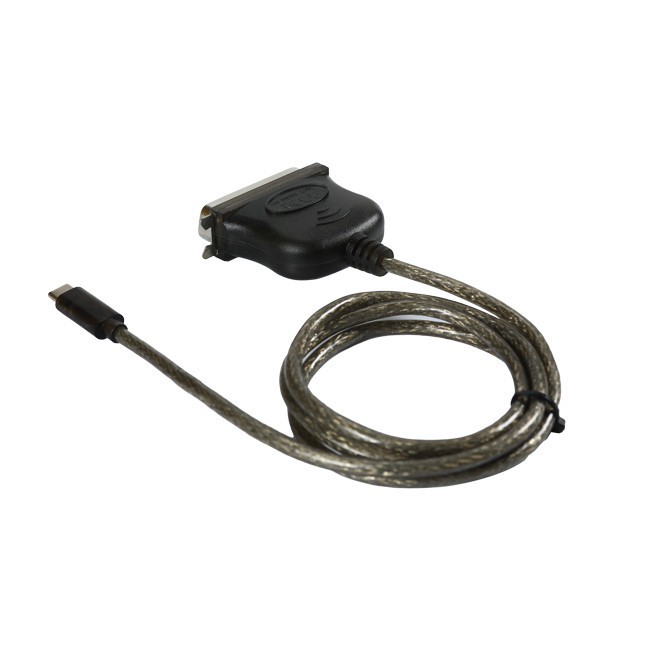
We offer a range of parallel cables that are suitable for kiosk connections. Our USB C To DB25 Parallel Printer Cable is designed to connect modern USB - C devices to legacy DB - 25 parallel printers. This cable provides a convenient way to bridge the gap between old and new technologies.
Our USB - C To CN36 Printer Cable is another option for those who need to connect a USB - C device to a printer with a CN - 36 connector. This cable is ideal for kiosk applications where a specific type of printer is required.
For those who already have a USB 2.0 port on their kiosk, our USB 2.0 To DB25 Parallel Printer Adapter Cable is a great solution. It allows you to connect a DB - 25 parallel printer to a USB 2.0 port, providing a simple and effective way to use legacy printers with modern kiosk systems.
Considerations for Kiosk Operators
If you are a kiosk operator considering using a parallel cable for your connections, there are a few things to keep in mind. Firstly, make sure that your kiosk has a parallel port or that you have the appropriate adapter to connect the parallel cable. Secondly, consider the distance between the kiosk and the peripheral device. If the distance is too long, you may need to look for alternative solutions.
It's also important to test the connection before deploying the kiosk. This will help you identify any potential issues and ensure that the parallel cable is working properly.

Conclusion
In conclusion, a parallel cable can be used for kiosk connections, but it depends on the specific requirements of the kiosk system. While parallel cables offer high - speed data transfer and compatibility with legacy devices, they also have some limitations such as limited distance and physical size.
As a parallel cable supplier, we are committed to providing high - quality products that meet the needs of our customers. If you are interested in purchasing parallel cables for your kiosk connections, we invite you to contact us for further discussion. We can help you choose the right cable for your specific application and provide you with the support you need to ensure a successful installation.
References
- "Parallel Interface Basics" - Electronics Tutorials
- "Kiosk Hardware and Connectivity" - Technology in Retail Journal
- "Cable Types and Their Applications" - Network Engineering Handbook